Project Overview
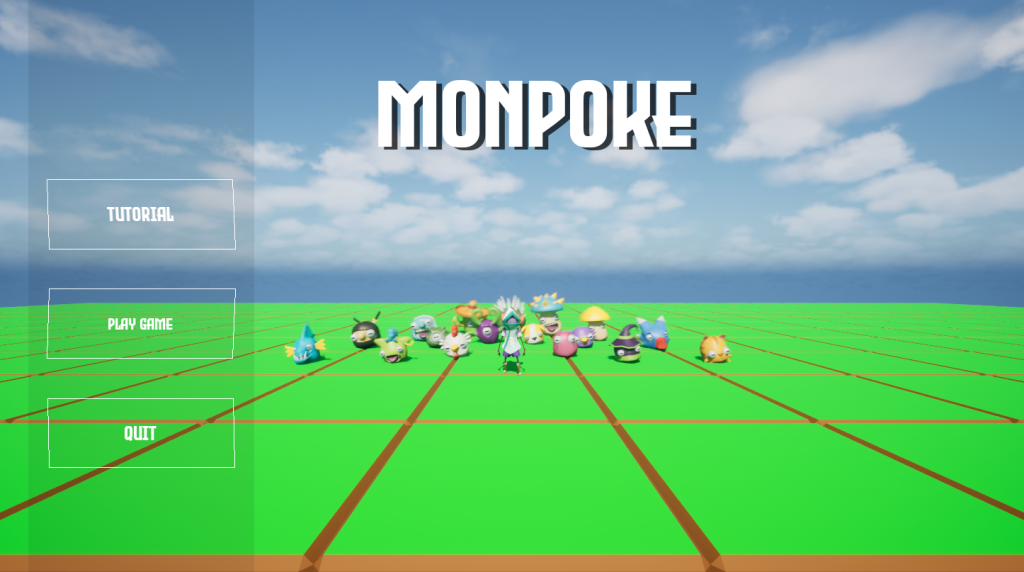
Monopoke is a turn-based monster-battling prototype developed in Unreal Engine as part of my second-year Systems Design module. The primary focus of this project was to design and implement scalable, data-driven gameplay systems using Unreal best practices, rather than building isolated mechanics.
The brief encouraged experimentation with Actor Components, Blueprint Interfaces, Event Dispatchers, Data Assets, Structs, Enums, and AI logic. My goal was to create a cohesive set of interconnected systems that could realistically support expansion into a full game.
Design Goals & Technical Focus
From the outset, I set three key goals:
- System-first design – Build modular systems that communicate cleanly rather than tightly coupled scripts
- Data-driven architecture – Separate gameplay data from behaviour wherever possible
- Scalability – Ensure new monsters, moves, items, and quests could be added without rewriting core logic
To support this, I explored both Behaviour Trees and State Trees for AI control. I ultimately chose Behaviour Treesfor this prototype, as they aligned better with the encounter-driven nature of the game and my planned combat flow.
Core Systems Breakdown
Turn-Based Battle System
At the centre of the prototype is a fully featured Turn-Based Battle System managed by a dedicated Battle ManagerBlueprint Actor. This actor is dynamically spawned when the player approaches a wild monster in the overworld.
When a battle begins, the Battle Manager:
- Disables player and monster movement
- Stops the wild monster’s AI Controller
- Switches player input to UI-only mode
- Displays the battle UI and enables cursor control
This creates a clean transition into a battle state and ensures all combat logic is controlled from a single, central system.
Encounter Positioning & Camera System
The Battle Manager uses an EQS query to locate valid positioning points for the player, the player’s monster, and the wild monster. Once positions are found, it:
- Moves all actors into place
- Rotates the wild monster to face the player
- Spawns the battle UI
- Sets the first turn to the player
To make battles feel more dynamic, I implemented a multi-camera system inspired by modern Pokémon games:
- A player camera behind the player’s monster
- An enemy camera behind the wild monster
- A cinematic camera that pans around the battlefield using EQS data
Camera changes are driven by turn state, helping reinforce whose turn it is while avoiding a static presentation.
Turn Logic & Battle Flow
The battle flow uses a simple alternating structure:
- Player turn (UI-driven)
- Wild monster turn (fully automated)
During the player’s turn, actions are selected via the Battle Screen UI. Once an action is chosen, the Battle Manager executes the logic and immediately transitions into the enemy’s turn.
The enemy turn is handled entirely by the Battle Manager:
- The monster checks its available moves
- Skips any move with zero AP
- Performs an accuracy check
- Executes the first valid move found
- Returns control to the player
This approach keeps combat pacing fast and predictable while remaining extensible.
Data-Driven Combat Systems
Elemental Type Damage Table
To support strategic depth, I implemented an elemental type effectiveness system inspired by Pokémon.
Type relationships are stored in a Data Table, containing:
- Attacking elemental type
- Defending elemental type
- Damage multiplier (2.0, 1.0, 0.5)
Each monster references its elemental type via a Data Asset. When damage is calculated, the system queries the table to retrieve the appropriate multiplier. This allows type balance to be adjusted directly in data without modifying Blueprint logic.
Damage Formula System
I built a damage system based on a simplified version of the mainline Pokémon formula. When a move is executed, the system:
- Retrieves move base damage
- Reads the attacker’s level and attack stat
- Reads the defender’s defence stat
- Applies the elemental type multiplier
This produces consistent, tunable damage values while leaving clear extension points for features such as:
- Critical hits
- Random variance
- Status effects (poison, paralysis, sleep)
Implementing this helped reinforce my understanding of combining mathematical systems with data-driven design.
Move Accuracy System
Each move includes an accuracy value stored in its Data Asset. When used, the Battle Manager performs a random roll to determine whether the move hits or misses.
This introduces uncertainty into combat and prevents battles from feeling deterministic. The system is designed to support future modifiers such as items, weather effects, or buffs/debuffs.
Monster & Move Architecture
Monster System
All monsters are built from a parent Monster Blueprint class, with shared logic for:
- Stats (HP, attack, defence, speed)
- Elemental type
- Animation references
Each monster has an associated Monster Data Asset storing:
- Base stats
- Move sets
- Mesh and animation data
- Elemental type
- Index number and description
Child Blueprints are used only for visual and animation differences. This ensures new monsters can be added quickly while maintaining consistency and reducing duplication.
Move System
Monster attacks are implemented using a parent Attack Move Blueprint combined with Move Data Assets.
Each Move Data Asset contains:
- Move name
- Elemental type
- Max and current AP
- Accuracy value
- Reference to a Skill Effect Blueprint
When executed, the parent Blueprint:
- Plays the correct animation
- Identifies caster and target
- Applies damage using the shared damage system
This architecture allows new moves to be added by creating new Data Assets and child Blueprints without altering core logic.
Item & Capture System
I implemented an in-battle capture system supported by a modular Inventory Component.
- Items are defined using Data Assets and behaviour Blueprints
- The battle UI reads directly from the inventory component
- Capture items follow a multi-stage “shake” sequence using weighted random checks
If capture succeeds, the monster is added directly to the player’s Monster Component. If it fails, the wild monster resumes combat immediately. This system expands the core gameplay loop while remaining consistent with the overall architecture.
Quest System
To add structure and long-term goals, I created a Quest System using:
- Actor Components
- Event Dispatchers
- A central Quest Manager
- A dynamic Quest UI
Quest Components can be attached to monsters, items, the player, or environment objects. These components broadcast progress events to the Quest Manager, keeping the system decoupled and scalable.
The system supports:
- Percentage-based quests
- Fraction-based quests
- Distance/location-based quests
This allowed me to integrate combat, exploration, and UI feedback into a single cohesive system.
Reflection & Key Learning
While I am pleased with the technical depth of this prototype, one of my biggest learning points was the importance of early planning and scope control. Although the project lasted eight weeks, I underestimated how quickly time would be consumed by system iteration and problem-solving.
Relying too heavily on external tutorials early on led to experimentation rather than structured progression. In future projects, I would:
- Define a clearer core feature set
- Lock scope earlier
- Schedule system development more deliberately
That said, this project significantly improved my understanding of:
- How long systems actually take to build
- How to structure scalable gameplay architecture
- How important early technical decisions are to long-term stability
What I Would Improve Next
With more time, I would:
- Refactor some systems to reduce Blueprint complexity
- Add status effects and secondary monster types
- Improve UI feedback for misses, captures, and damage types
- Implement party switching during battle
- Add save/load support for monsters and quests
Outcome
This project pushed me to think like a systems designer rather than a feature implementer. I now have a much clearer understanding of modular design, data-driven workflows, and how interconnected systems form a complete gameplay loop. If I were to restart this project today, I’m confident I could produce a more polished version using the experience gained here.